
Features

Eight areas. One connected job.

Find the part of your working day you want to bring together, then open a card to see what it does. Prices, kit lists and inspection records are a guide only.

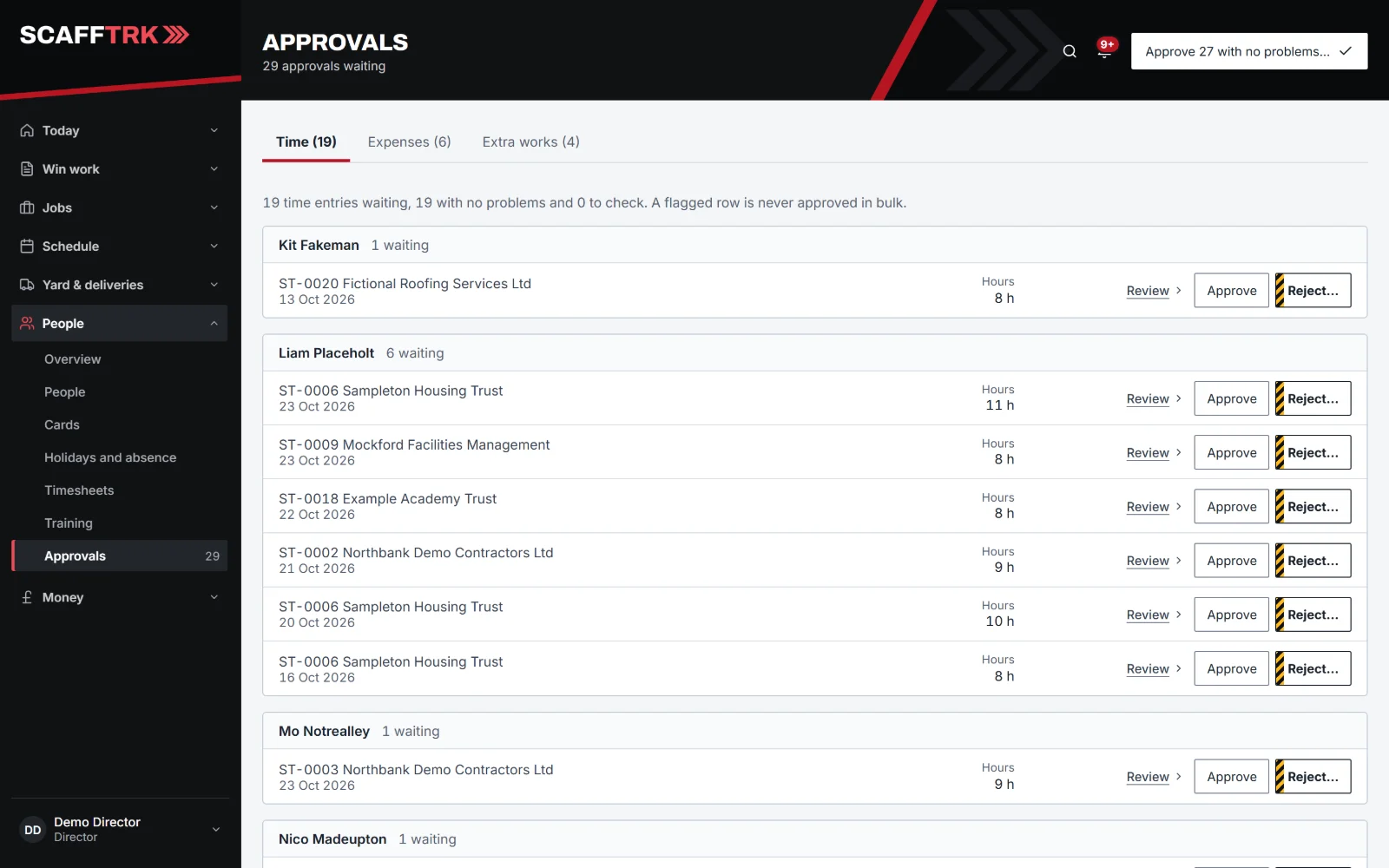
The ScaffTRK Approvals screen on a laptop, listing time entries and holiday requests waiting for approval. Sample data.
The office: approve time and holiday requests, and check the figures.
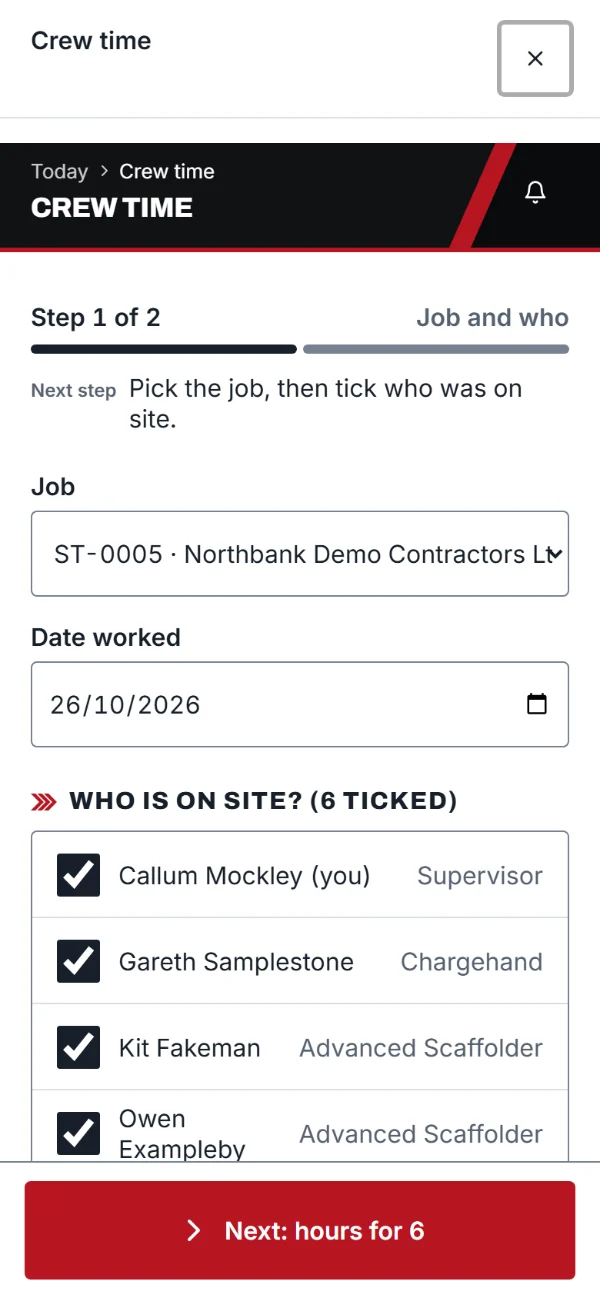
The ScaffTRK Crew time screen on a phone: pick the job, then tick who was on site. Sample data.
On site: log crew time from a phone.
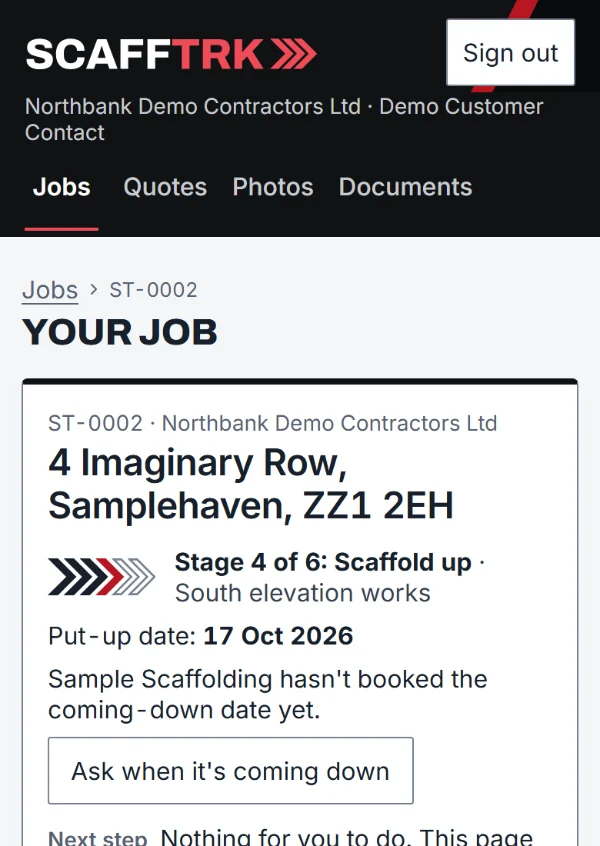
The ScaffTRK customer portal on a phone, showing a job's address, where it is up to and its put-up date. Sample data.
Your customers: see where their job is up to.

Win work

Survey, price, quote.

20 functions

Quotes and calculator

Work out scaffold quotes, keep them and turn accepted ones into jobs.

5 functions

What it does
  • Every quote with its stage, from survey to accepted.
  • Enter the scaffold dimensions and get a kit list and a guide price. Guide only, not a design.
  • Keep versions of a quote and send one to the customer portal.
  • The quote value becomes the job revenue.
  • Customers accept or decline a quote you send them and download the quote document. Change a sent quote and it comes off their portal until you send it again. The document is a guide only.

Rate book

Keep the sell rates the calculator prices from.

3 functions

What it does
  • Sell price of every item; weekly hire after the included weeks.
  • Keep the rates the calculator uses up to date.
  • VAT, travel and the other settings the calculator reads.

Enquiry pipeline

Log every enquiry and follow it through to a quote.

6 functions

What it does
  • New to Won or Lost, with what is going stale.
  • Who asked, what for and where; numbered and assigned.
  • Next action and date, on the Due dates list.
  • On the crew board's day and the surveyor's Today.
  • Client and site carried into the calculator.
  • Pick a reason from the firm's own list; reports count them.

Website enquiry form and quick quote

Let visitors send an enquiry or see a guide price range online.

6 functions

What it does
  • A page with your firm’s name; each message becomes a Website enquiry with a bell alert, and can carry up to three photos.
  • A link or a copy-and-paste snippet for your own site.
  • Your wording and a number of days, approved by the firm owner before the form can go live.
  • Standard jobs under your height limit show a range worked out from your own rates. Guide only.
  • Taller or unusual jobs are not priced online; the visitor is told a survey is needed.
  • Each quick quote arrives as an enquiry with the range, for your office to check first.

Jobs

Jobs, schedule, crews.

9 functions

Jobs

Create jobs, track them from survey to strip, and keep the paperwork together.

3 functions

What it does
  • A list of jobs by stage, supervisor, type, risk and priority, with Strip due and To invoice at a tap.
  • One job record with its overview, schedule, kit, money, time, photos, extra works, documents and history.
  • Set up a job, assign a manager, supervisor and crew, and move it through its stages.

Schedule

Plan crews on a board and calendar and see who is where.

3 functions

What it does
  • The jobs they are on, day by day, on the Agenda.
  • A week view and a schedule board across all jobs.
  • Drag a job onto a day, or a person onto a job, to book it.

Equipment

See which scaffolds are standing and what kit is on them.

3 functions

What it does
  • Each job with its supervisor, days up and strip date.
  • The estimated kit recorded from the quote. Guide only.
  • Filter the list to what is booked for strip and what is not.

Schedule

Time, photos, extra works and site documents.

26 functions

Time

Log hours on site and keep timesheets in one place.

3 functions

What it does
  • The hours they have logged and where each one stands.
  • Clock in and out or add hours; it works offline and sends when the signal is back.
  • Weekly totals by person and job (CSV export, hours only), and time logged on someone's behalf.

Extra works

Record extra work and get the client's signature on site.

4 functions

What it does
  • Extra work, who did it and what it is worth.
  • Write up the extra work from the phone, offline if need be.
  • The client signs for the extra work on site.
  • The office can write up tickets for every job.

Photos and issues

Capture site photos and documents, raise issues and see them fixed.

4 functions

What it does
  • Open issues with severity, job and status.
  • Capture on site; uploads queue offline and send later.
  • Describe a problem on a job so the office sees it, offline if need be.
  • Close an issue with a note once it is dealt with.

Expenses

Submit expenses with receipts and see what is waiting for approval.

3 functions

What it does
  • Each expense with its number, job and approval status.
  • Category, amount and receipt; it goes to approval, offline if need be.
  • Expenses by job, category, receipt status and submitter.

Inspections and handovers (guide only)

Record scaffold inspections and handovers so nothing is missed. Guide only.

5 functions

What it does
  • A dated record per scaffold. Guide only; a competent person decides.
  • Handover details kept with the job. Guide only.
  • A list of scaffolds waiting for their next inspection. Guide only.
  • Each scaffold on a job with its status, last record and next due date. Guide only.
  • A finished record as a PDF, shared with the customer when the office chooses. Guide only.

RAMS, permits and documents

Keep method statements, permits and site documents with the job.

7 functions

What it does
  • Each document with its provider, reference and renewal date, and a warning before it runs out.
  • Your firm's risk assessments and method statements stored per job, with versions and a briefing record. ScaffTRK keeps what you write; it does not write, check or approve it.
  • Permits and licences for a job with who issued them, the reference and the date each one runs out.
  • A checklist of the documents your firm wants on a job, showing what is on file and what is missing. Guide only.
  • The topic, who was there and a signature from each person, saved from the phone even without signal.
  • A numbered record the office follows up, written from the phone even without signal.
  • The office chooses which documents appear on the customer's job page. Nothing is shared until it is chosen.

Yard & deliveries

What is standing, what is in the yard and what is on the road.

16 functions

Yard, stock and kit ordering

Know what kit is in the yard and order what a job needs.

9 functions

What it does
  • Kit on hand by type, with what is out on jobs, damaged and held back.
  • What went out, what came back and what is still on site, job by job.
  • Record a load out to a job and a load back from the phone, offline if need be.
  • Keep a dated record of each check and put a failed item aside. Guide only.
  • See the shortfall for a job and raise a purchase or cross-hire order.
  • See what is on hire and mark it off-hired before the date it is due.
  • Buy or hire in kit against a job, print the order and receive it in full or in part.
  • Names, contacts and account references for kit sellers and hire companies.
  • A list of damaged and held-back kit to repair or write off, with a reason.

Loading, delivery and fleet

Plan loads and deliveries and keep vehicles in check.

7 functions

What it does
  • What goes on which vehicle for a job, built from the job's kit.
  • Drops and pick-ups by vehicle and day.
  • Numbered, signed for on site, photos, linked to the yard docket.
  • Details, documents and the dates that expire.
  • A warning before each date runs out.
  • Pass / Caution / Fail per item. Guide only.
  • MEWP, telehandler, hoist. Guide only.

People

Staff, training cards, safety issues.

16 functions

People

Keep staff records, gangs and certifications in one place.

4 functions

What it does
  • Name, division, gang and status for everyone.
  • Keep each person's record and card details up to date.
  • Bring in a staff list from a CSV file.
  • Rates are kept apart from the rest of the record.

Cards, training and expiry

Track scaffolder cards and training so renewals are never missed.

7 functions

What it does
  • A card list per firm, with a photo of each card and refresher dates.
  • Warnings to the card holder and the office, set per card type.
  • Each person sees their own cards and can add a renewed one for the office to check.
  • Course, provider and dates, with the new card added once the course is passed.
  • Bring in a card list from a CSV file.
  • The card register and the cards running out soon, as CSV.
  • Match people to jobs by card level. Guide only: the firm decides who is competent.

Holidays and absence

See who is away, ask for time off and approve it.

5 functions

What it does
  • Ask for holiday on your phone, even offline, and see your allowance. Guide only.
  • Approve or decline requests, add absences and see who is away, by person and gang.
  • Approved time off greys a person out on the crew board.
  • Prepare CIS records. Subcontractor payments from approved time.
  • Export hours to payroll. A file for the payroll package.

Money

Expenses, profit, pay rates, reports, variations and credit control.

29 functions

Approvals

Approve time, extra works and expenses before they count.

3 functions

What it does
  • One list of everything waiting for a decision, holiday requests included for those who can approve them.
  • The same list across every job, approved a row at a time.
  • The person who sent it sees why.

Job costs and P&L

See revenue, cost and margin job by job.

4 functions

What it does
  • Contract sum, billed to date, approved costs and margin, job by job. Guide only.
  • The Money record for a job, opened from Money. The job itself only has an Open in Money link.
  • Revenue and finance notes for their own jobs, on the job's Money record.
  • Correct the money side of a job across the firm.

Reports

Download weekly, live-scaffold, quote and cost reports as CSV.

5 functions

What it does
  • Jobs installing, stripping or on site in a chosen week.
  • Every scaffold installed, with days up and strip status.
  • Crew planned per day by division and site.
  • Quotes by stage, and which are ready to become jobs.
  • Cost reports, where the person's rights allow.

Hire and invoicing

Bill scaffold hire by the week and raise invoices you send yourself.

5 functions

What it does
  • Extra hire charged by the week after the included weeks.
  • Invoices and applications from hire and from completed work. Records only; you send them yourself.
  • Hire in progress and the money still to collect.
  • Payments entered by hand, and an aged list of what is still owed.
  • Customers see their issued invoices, credit notes and what is still owed in the portal. You switch it on in Hire settings.

Variations, retentions and credit control

Agree changes to a job, hold retentions and chase what is owed.

7 functions

What it does
  • Extra or changed scope recorded, priced and sent; the customer accepts in their portal or the office records the answer.
  • What was asked, by whom, signed and photographed; priced later.
  • Payment days, a retention percentage and when it can be released, per job.
  • Held automatically when an invoice issues on a job with retention terms; release dates on the Due list.
  • A list of overdue invoices with calls, promises, disputes and set-offs logged.
  • A PDF for each customer of invoices, payments and what is outstanding, for the office to download and send.
  • The contract value plus accepted variations, extra hire and extra works, less credits, with what has been invoiced and held.

Customers

The customer portal.

4 functions

Customer portal

Let customers follow their jobs, photos, documents and quotes online.

4 functions

What it does
  • A customer sees only what the office has chosen to share.
  • The customer answers a quote the office has sent.
  • It reaches the office as an issue on the job.
  • Open the customer portal yourself from Settings to see what customers see.

System

Users, roles, audit and data corrections.

10 functions

Dashboard

See what needs doing today, who is on site and what is standing.

5 functions

What it does
  • A short list of the items waiting on you, such as approvals and open issues.
  • The crews and sites for the day, on the Today screen.
  • Scaffold up on site, with days up.
  • How many jobs are at each stage, from survey to strip.
  • Crew planned per day for the week ahead.

Users, roles and settings

Set up who can sign in, what each role can do and company details.

5 functions

What it does
  • Who changed what, with before and after.
  • Sign-ins, roles and the person or client each login is linked to.
  • Cut a role by function, or set every right by hand.
  • Contact details and job number prefix. ScaffTRK sets which functions are on; ask it to add more.
  • Every such edit is written to the activity log.
Your next step

Bring your jobs
into one place.

Register interest